 Social bookmarking is a popular way for users to share their personal bookmarks of useful sites with other users. Since most of the bookmarks are classified by topics, tags or categories, people around the world with interests similar to the user can easily locate these sites by viewing their online bookmarks.
Just over the last couple of years, this concept has caught on with so many users that social bookmarking sites are now very popular and highly ranked by search engines. We shall discuss and list these sites in a separate article. For now, we want to provide you a code so that you can have something to work with.
Add bookmark code into your blog:
1.AddThis
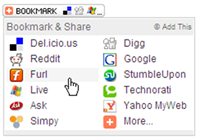
AddThis now offers a beautiful alternative to social bookmarking icons or those 16x16 pixel images that clutter the footer of almost every blog post on the web.
With AddThis, you can easily put links to all popular social bookmarking websites in a two-column drop down that appears only when someone hovers the mouse over the Bookmark button - the icons and links stay hidden or invisible otherwise.
If a visitor cannot find his/her favorite social bookmarking site in the AddThis menu, they can click the "More.." link access all other other social bookmarking services. Very cool!
Just add the following code to your blog template.
<!-- AddThis Bookmark Button BEGIN -->
<script type="text/javascript">
addthis_url    = location.href;
addthis_title  = document.title;
</script><script type="text/javascript" src="http://s7.addthis.com/js/addthis_widget.php?v=12"
></script>
<!-- AddThis Bookmark Button END -->
Though you can grab the AddThis button for your blog without registration, I seriously recommend getting a
free account as you get access to invaluable stats.
2. Social bookmark text links

Now we are going to see like putting them:
1.Go to Template -> Edit HTML -> Tick into Expand Widget Templates
2. We looked for the following code:
<p class='post-footer-line post-footer-line-3'/>
3.
That line with the following code replaces:
<p class='post-footer-line post-footer-line-3'>
<div class='rsociales'>
Share this post with:
<ul>
<li><a expr:href='"http://www.technorati.com/faves?add=" + data:post.url + "&title="
+ data:post.title' target='_blank'><img alt='Agregar a Technorati' class='rsociales-sobre'
src='https://blogger.googleusercontent.com/img/b/R29vZ2xl/AVvXsEiCWvYQAl5YDOTfMfaMpj7zfNi8f534kPYO1pD4Gl2veACa9LdEvyCPy-1hD2Vzu8J9r1LI6sSM6jOmqBwJc2nJhXwCOtaQ132R9A1UGVNuderFjuH06oxId98Yp6eiFJwgPRMacTe4ok8/s1600/technorati.gif'/></a></li>
<li><a expr:href='"http://del.icio.us/post?url=" + data:post.url + "&title="
+ data:post.title' target='_blank'><img alt='Agregar a Del.icio.us' class='rsociales-sobre'
src='https://blogger.googleusercontent.com/img/b/R29vZ2xl/AVvXsEjePfA8e3kvdXprxIFjHLtpUJ3zvmWxrJpuD3XO3kWuC6O-BgwkR2vrrHN4mQgd1td5AZmO7kVTrGUXBBp-O7RDanzXEBMlRzEEQXjfQIQVQR_M_rGpqnfV4qgNcp1G6sS2OWqyldzqqpU/s1600/delicious.gif'/></a></li>
<li><a expr:href='"http://digg.com/submit?phase=2&amp;url=" + data:post.url
+ "&title=" + data:post.title' target='_blank'><img alt='Agregar a DiggIt!'
class='rsociales-sobre' src='https://blogger.googleusercontent.com/img/b/R29vZ2xl/AVvXsEj6Ept1NbRZE-sICZhgUiMbYuaPvH3hNCakIqL-FIxqBfPvzT1n4a_YXzVmKdcw8tjjXvnNBGRiWkfMGHUlqxvGFP3ZBk6-Q5cMPuZItvVXl3PWQsgqDL1QODVYVB02h7vgYkNE6_tfbKw/s1600/digg.png'/></a></li>
<li><a expr:href='"http://myweb2.search.yahoo.com/myresults/bookmarklet?u=" +
data:post.url + "&title=" + data:post.title' target='_blank'><img alt='Agregar
a Yahoo!' class='rsociales-sobre' src='https://blogger.googleusercontent.com/img/b/R29vZ2xl/AVvXsEiIF85o1VPeDsNfqKFhkE_-oFukqStwDe0fnk-LUIeKOAqwqdXqnsTQHsLkH6wWMp6lCAXe47BMAS-PGCaqrgvaxlyNINPFsJ2HWARVZ06FfFDp3nabkrrLYIG7U0P5lvbYh40MeyW4nPw/s1600/yahoo.png'/></a></li>
<li><a expr:href='"http://www.google.com/bookmarks/mark?op=edit&output=popup&bkmk="
+ data:post.url + "&title=" + data:post.title' target='_blank'><img alt='Agregar
a Google' class='rsociales-sobre' src='https://blogger.googleusercontent.com/img/b/R29vZ2xl/AVvXsEjDcjGIeAsGySIoMph-rmi1KKb_AhLkuW6Mtr6H-qrjEaIug3OncGPGagzG01MBJBRDvc0hjY6-M_ucfJ28kvecJSzjf7eMerr60rYi_PWjR91MjeIXfDk59-lvWnfh0-FXwritqK0akII/s1600/google.gif'/></a></li>
<li><a expr:href='"http://meneame.net/submit.php?url=" + data:post.url + "&title="
+ data:post.title' target='_blank'><img alt='Agregar a Meneame' class='rsociales-sobre'
src='https://blogger.googleusercontent.com/img/b/R29vZ2xl/AVvXsEiNIfj2f6cu2JCtWUjh6mEB_oNxGw0I7YO24FGfQQ_r1fA8xyuSdWjJkDCr2-_0y80aFgdM2laOW8xlW_tW3152JKpJEmLS024rwIsdD8UWF69gkF2wY_xeNdSelatzwoTusRxYFrOE_c4/s1600/meneame.png'/></a></li>
<li><a expr:href='"http://www.furl.net/storeIt.jsp?u=" + data:post.url + "&title="
+ data:post.title' target='_blank'><img alt='Agregar a Furl' class='rsociales-sobre'
src='https://blogger.googleusercontent.com/img/b/R29vZ2xl/AVvXsEg1eAKsKX2qlEQx91jVSm-v6qsjvr6jqgbwJbBy6Q5g030VqRyqLqGCmPhhPp9V-WGMQz-3CAdWI0LKKVMg5Q4VS-9LbYxHAirZNqh3tkhJEm7t0zEadpitgj1AMW-l5yFyrs13rT_ye20/s1600/furl.png'/></a></li>
<li><a expr:href='"http://reddit.com/submit?url=" + data:post.url + "&title="
+ data:post.title' target='_blank'><img alt='Agregar a Reddit' class='rsociales-sobre'
src='https://blogger.googleusercontent.com/img/b/R29vZ2xl/AVvXsEikTDgsPemu4frlRCI_Bkl7-VYGaUOL6AoBqbnBTdJxlLSatzK8_OucpEQ7vQ6JV_P4yrVS33FMGwfO9PY3DSYcFELjJk2pRwefJw7VpZ-BlewUx9RW5PcW0oV-LvjX2MuhfildxHM0y_4/s1600/reddit.gif
'/></a></li>
<li><a expr:href='"http://ma.gnolia.com/beta/bookmarklet/add?url=" +
data:post.url + "&title=" + data:post.title' target='_blank'><img alt='Agregar
a Magnolia' class='rsociales-sobre' src='https://blogger.googleusercontent.com/img/b/R29vZ2xl/AVvXsEiHUaq89_wp4qMQmPBvcWLeh9WHB9hswIMnpHnZ8TMtuavfy1xPCR_qGvCLAlkflAAkc8JI3gj-Gl_rgCM8tC9KyWSY3230Va78fMq0aE0PheDzCj34XYw-UO4FzLKe0roIWt817Th3e_I/s1600/magnolia.gif'/></a></li>
<li><a expr:href='"http://www.blinklist.com/index.php?Action=Blink/addblink.php&Description=&Url="
+ data:post.url + "&title=" + data:post.title' target='_blank'><img alt='Agregar
a Blinklist' class='rsociales-sobre' src='https://blogger.googleusercontent.com/img/b/R29vZ2xl/AVvXsEi4GD8vlFjC3LA9a9PeTnj2ERXFsUQMB1RymsFUmVAkN4uLFuBeomIZW02LJ3IVZFszSYTY3C4KMkbsnA-NVt3-MiSVZ5nC424JGnuGdnPQbWty-JeJeEfdXUFOiBu01FnhWULboEw-aQM/s1600/blinklists.gif'/></a></li>
<li><a expr:href='"http://blogmarks.net/my/new.php?mini=1&simple=1&url="
+ data:post.url + "&title=" + data:post.title' target='_blank'><img alt='Agregar
a Blogmarks' class='rsociales-sobre' src='https://blogger.googleusercontent.com/img/b/R29vZ2xl/AVvXsEgFrDBHLCLQjmGoE3wmA0VonGKR7-z-4Z4D5qlXIgO1xJUm4l6dx4EGrRfnvVnelfC3WgWz6smceyo3INQh-KMUDdiN4aObWN3BXVEgn87aF7bslbAJMOaCMG7igB3C6c1f-KufPSrvtE4/s1600/blogmarks.gif'/></a></li>
</ul>
</div>
</p>
4. Now it looks for the code:
]]></b:skin>
And right above it sticks the following thing:
.rsociales ul {
display:inline;
margin:0pt !important;
padding:0pt !important;
}
.rsociales li {
background:transparent none repeat scroll 0%;
display:inline;
list-style-type:none;
margin:0pt;
padding:2px;
}
.rsociales img {
border:0pt none;
float:none;
margin:0pt;
padding:0pt;
}
.rsociales-sobre {
opacity:0.4;
}
.rsociales-sobre:hover {
opacity:1;
}


 There are couple of suggestions that would help you sync your bookmarks with mobile


