

Make Screensavers, YouTube Videos from PowerPoint
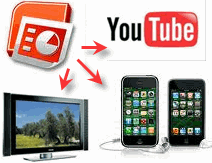 Sometime I've got some questions: how to set Screensavers from Powerpoint(PPT) file and how to create movie from PPT files that can be uploaded to Youtube or Google video. An this tutorials answers two common questions for you.
To Create Picture Screensaver from PowerPoint Slides.
Create an empty folder in "My Pictures" on your hard-drive. Now open the PPT or PPS file in Microsoft PowerPoint and click File -> Save As. Select "Enhanced Windows Metafile" in the file-type drop-down and click "Every Slide"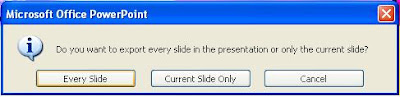 Your Powerpoint presentation is now available as EMF file in one folder. Right click the deskop -> Properties -> Screensaver and select the "My Picture Slideshow" screensaver. Browse to the folder where you save the PPT and you're done. [Disable "Use Transition Effects" for best results]
How To Upload PowerPoint to YouTube or Google video.
First you must convert PPT files to movies files or flv files. Then you can upload to YouTube or Google video.
There are two option here - either run the PowerPoint as a full-screen slideshow and capture the desktop using some screen recording software OR make a movie from PowerPoint slide images. We'll use the latter approach though you won't see the animations or transitions in the PowerPoint movie.


 Here is a secret keyboard shortcut to fullscreen view of your images in Picasa. When you are in Library View, Move your mouse over any picture thumbnail, Hold down the 'CTRL' key, and then press 'ALT' key. You will instantly get a fullscreen view of that picture.


 “Where do you find images for your blog?” That is a question that I get asked quite often, therefore I decided to write about it.
 Vozme is web based tool that turns any snippet of text into an


 This site is mainly targeted to promote Windows Vista from Microsoft, thus you cannot expect any other Operating System prescribed in the configuration. Also there is a list of retailers in different cities across India for purchasing the prescribed PC configuration. Although the site targets Indian users, but the PC configuration wizard can be used in other countries like United States, United Kingdom, Singapore, Germany, Japan, Russia and China.